Max Mega Menu and the aria-haspopup attribute
TL;DR: Automated accessibility tools often flag missing aria-haspopup attributes because they assume all menus should behave like “Desktop Applications.” However, Max Mega Menu follows the W3C Disclosure Pattern. We use aria-expanded , which provides a better experience for screen reader users and avoids confusing navigation “modes.”
If you’ve recently run an accessibility audit or used an automated checker, you might have seen a suggestion to add the aria-haspopup attribute to your menu items.
Adding the aria-haspopup attribute to Max Mega Menu would be a trivial change to the code, so why don’t we do it? We intentionally omit the aria-haspopup attribute to ensure your site remains accessible to screen reader users. Here is why.
1. Following W3C’s lead
The World Wide Web Consortium (W3C) develops standards and guidelines to help everyone build and enjoy a web based on the principles of accessibility, internationalisation, privacy and security.
The w3.org homepage itself uses a mega menu, and does not use the aria-haspopup attribute:
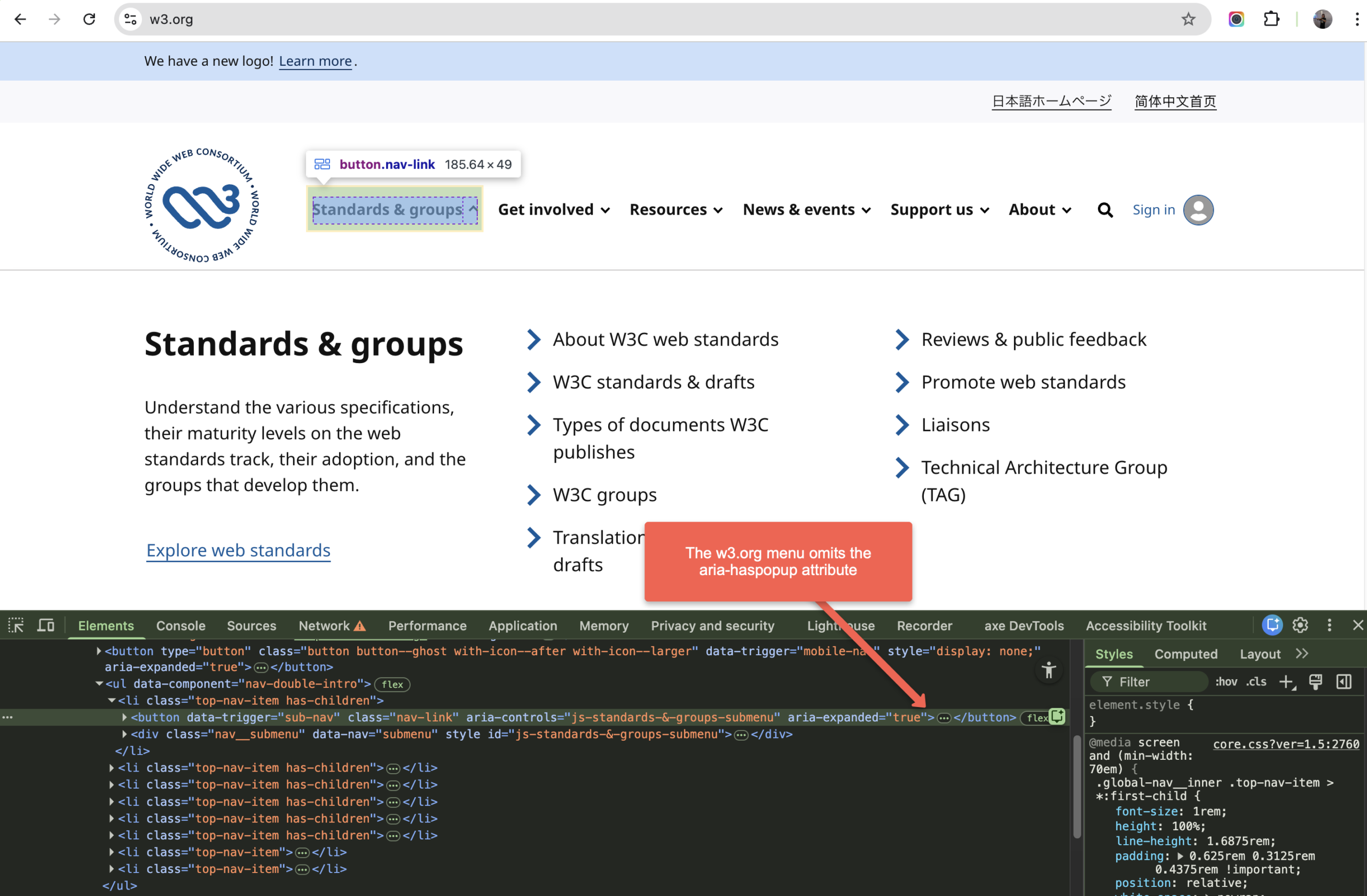
According to the W3C, most website navigations should follow the Disclosure Pattern:
A pattern more suited for typical site navigation with expandable groups of links is the Disclosure Pattern.
— https://www.w3.org/WAI/ARIA/apg/patterns/menubar/examples/menubar-navigation/
The W3C notes that the alternative “Menubar” pattern (which does require the aria-haspopup attribute) is intended for application-like interfaces (think Google Docs or online versions of desktop applications) and can actually make standard website navigation more difficult for screen reader users by forcing them into a specific “Application Mode.”
Max Mega Menu follows the disclosure pattern, with some enhancements.
2. aria-expanded vs. aria-haspopup: What’s the difference?
By using aria-expanded , Max Mega Menu tells the user exactly what is happening: they are toggling the visibility of a sub menu. When aria-haspopup is used incorrectly on a standard link, a screen reader may expect a complex desktop-style menu where the user must use arrow keys to move around, which can lead to users getting “stuck” in the menu.
The core of the confusion often lies in these two attributes. While they might seem similar, they tell a screen reader user very different stories:
| Attribute | The Message Sent to Users |
|---|---|
aria-expanded |
“This button controls a section of content that is currently hidden or visible.” |
aria-haspopup |
“This button triggers a temporary overlay, like a context menu or a dialog box.” |
3. We Prioritise the “Disclosure” Pattern
By following the Disclosure Pattern (and the example code given, which includes the aria-expanded attribute and omits the aria-haspopup attribute), we ensure:
- Adherence to w3c guidelines.
- Users can tab through items naturally without being forced into “arrow-key” navigation.
- Users hear “Expanded” or “Collapsed,” which is the most reliable way to communicate state across different browsers and screen readers.
How to Add aria-haspopup
If you understand the implications and still wish to add the attribute, you can use the built-in WordPress nav_menu_link_attributes filter. Adding this snippet to your theme’s functions.php file will inject the attribute into your menu links.
|
1 2 3 4 5 6 7 8 9 10 11 12 13 |
/** * Add aria-haspopup to Max Mega Menu items for specific audit compliance. * Note: This is not recommended for standard Disclosure-pattern navigation. */ function mmm_add_aria_haspopup( $atts, $item, $args ) { // Check if this is a menu item with children (where a sub-menu would occur) if ( in_array( 'menu-item-has-children', $item->classes ) ) { $atts['aria-haspopup'] = 'true'; } return $atts; } add_filter( 'nav_menu_link_attributes', 'mmm_add_aria_haspopup', 10, 3 ); |